The test mode is a function where you can test the components individually, especially useful when troubleshooting the ventilation unit. Depending on the age, there are different ways to access this function. This applies to control panels labelled AVC-01, AVC-02, ACETEC.
Option 1 with control panel
Activation of programming mode 2.
Press the buttons at the same time  and
and  for 5 seconds until parameter 5 appears in the display window. Then scroll with until you get to parameter 99. Then press and hold
  all the time without releasing and press once on so that it changes from OF to ON. You have now entered the test mode and can run the components separately. Scroll with to the parameter you want to test as listed below. With the and you will go back. To exit test mode, press several times on until you have passed the last parameter.
- Parameter 1 shows programme version
- Parameter 2 displays software version on motherboard
- Parameter 14 Fan speed comfort supply air
- Parameter 15 Fan speed comfort exhaust air
- Parameter 21 Heat exchanger
- Parameter 31 Heating coil, active (On), (supply air fan on economy)
- Parameter 35 Relay damper control, active (On)
- Parameter 36 Cooling control relay, active (On)
- Parameter 37 A-alarm relay, active (On)
- Parameter 38 B-alarm relay, active (On)
- Parameter 41 Display supply air temperature (°C)
- Parameter 42 Display exhaust air temperature (°C)
- Parameter 43 Display outdoor air temperature (°C)
- Parameter 61 VVX & EVB, active (On) , Supply and Exhaust fan on forced
Option 2 via printed circuit board
If option 1 does not work, it is a slightly older software and then you have to do it in another way.
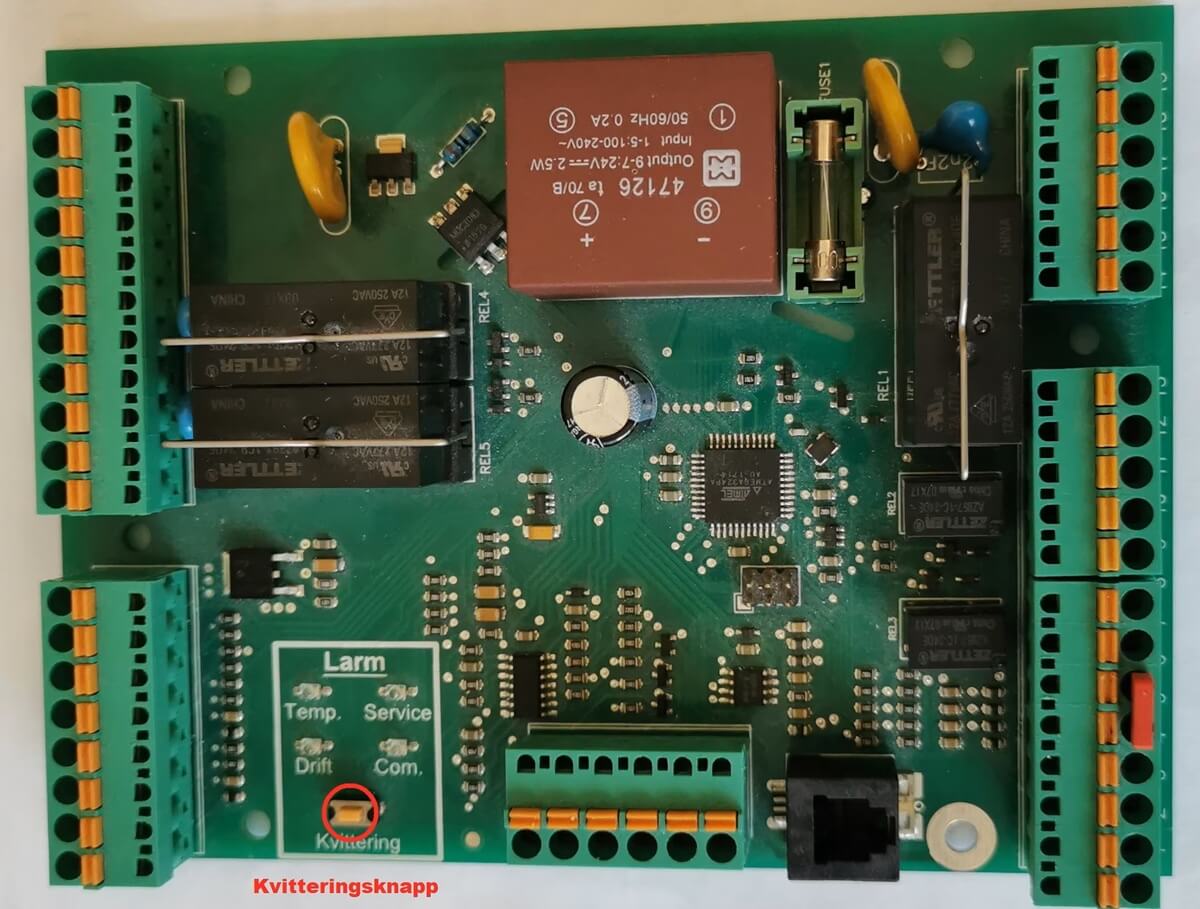
Switch off the power to the unit so that it is completely de-energised, open the hatch on the ventilation unit and unscrew the cover over the circuit board. On the circuit board itself, there is an orange acknowledgement button and 4 LEDs (see picture. To enter the test mode, press and hold the acknowledgement button and switch on the power, hold the acknowledgement button until the LEDs start flashing and then you can release the button. You have now entered the test mode and can run the components separately.
Browse with to the parameter you want to test according to the parameter list below. With the and you will go back. To exit test mode, press several times on until you have passed the last parameter.
- Parameter 1 shows programme version
- Parameter 2 displays software version on motherboard
- Parameter 11 Fan speed save supply air
- Parameter 12 Fan speed save exhaust air
- Parameter 14 Fan speed comfort supply air
- Parameter 15 Fan speed comfort exhaust air
- Parameter 17 Fan speed forced supply air
- Parameter 18 Fan speed forced exhaust air
- Parameter 21 Heat exchanger
- Parameter 31 Heating coil, active (On), (supply air fan on economy)
- Parameter 35 Relay damper control, active (On)
- Parameter 36 Cooling control relay, active (On)
- Parameter 37 A-alarm relay, active (On)
- Parameter 38 B-alarm relay, active (On)
- Parameter 41 Display supply air temperature (°C)
- Parameter 42 Display exhaust air temperature (°C)
- Parameter 43 Display outdoor air temperature (°C)
- Parameter 61 VVX & EVB, active (On) , Supply and Exhaust fan on forced