


EvoControl EvoDry RD
Models: EvoDry RD EC
 English (UK)
Press the button Menu 

Press the button Tidur 

Press the button New 
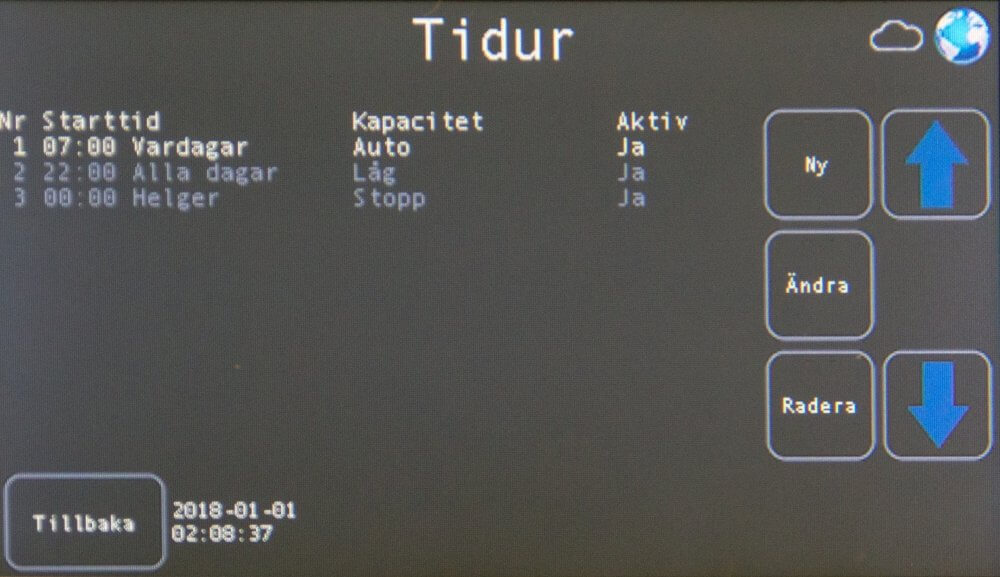
Set the activation time.

Press the button Tidur  to activate the function.

Example:
| Active | Yes | Monday - Friday 07:00 the unit starts in capacity Auto | |
| Drift mode | car | ||
| Day | Weekdays | ||
| Hour | 07 | ||
| minute | 00 | ||
| Active | Yes | Weekdays 22:00 the unit starts in low capacity | |
| Drift mode | Low | ||
| Day | Weekdays | ||
| Hour | 22 | ||
| minute | 00 | ||
| Active | Yes | Saturday 00:00 the aggregate enters into capacity Stop | |
| Drift mode | stop | ||
| Day | Saturday | ||
| Hour | 00 | ||
| minute | 00 |
In this example, the unit is running at capacity car Monday to Friday, 07:00 – 22:00.
The unit will be in operational mode from 00:00 on Saturday until 07:00 on Monday stop.
For the rest of the week, the unit is in operating mode Low.